The right answer from your own documents, during the call
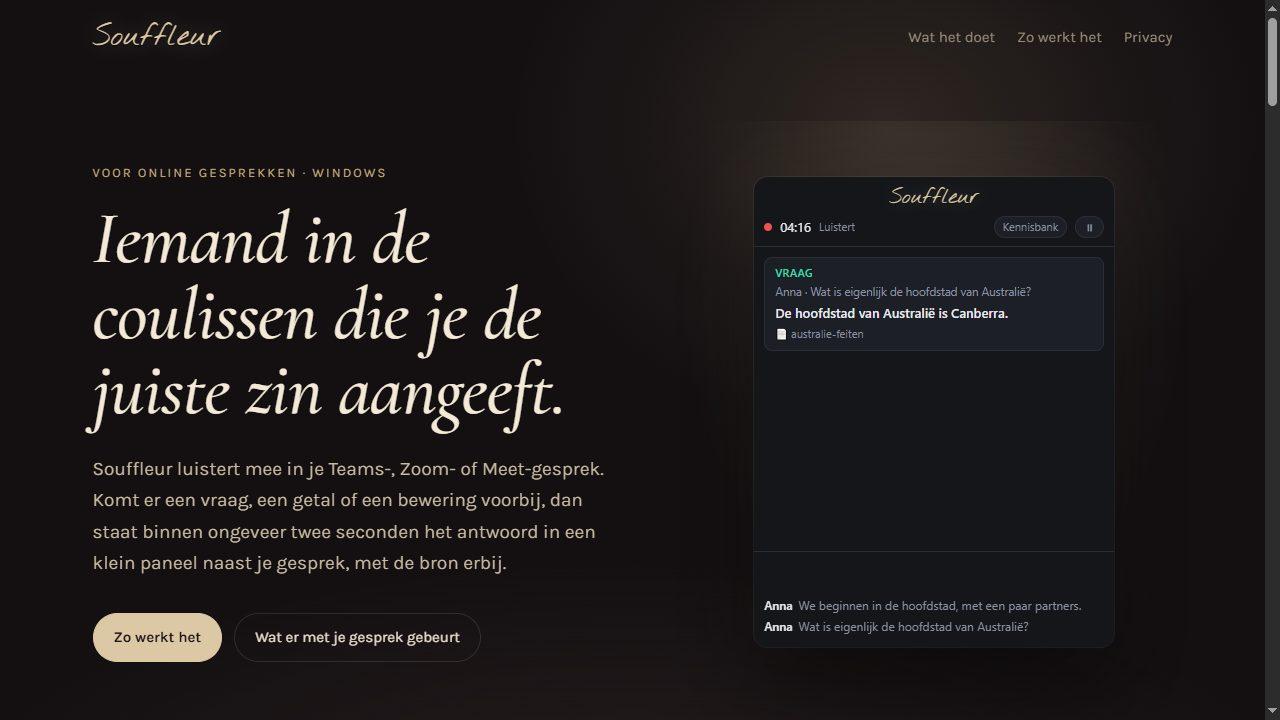
Souffleur is a Windows panel that listens along with your online call. When a question, figure or claim comes up, you see the answer from your own documents within about two seconds, with the source.
What it does
- Answers with sources. For a question or figure, Souffleur finds the answer in your own knowledge base and shows the file it came from.
- Spot mismatches. When a claim differs from your sources, you get a warning with the quote.
- Report and briefing. After the call you get a report with decisions and actions. The next call opens with the open items.
How it works
- Choose a knowledge base. Point it at a folder of PDF, Word, Excel and email files. New files are searchable within seconds.
- Start the call. Souffleur listens to your microphone and the sound of your Teams, Zoom or Meet call. No bot joins.
- Read the cards. Answers and warnings appear as cards in the panel. Pause stops anything from leaving your computer.
- Get the report. After Stop, the report is ready within a minute.
Who it is for
For people with many online calls where facts from their own documents must be right, such as quotes, schedules and terms.
To be honest
- Not for sale yet: there is no installer and no payment. For now it runs only on the maker's own computer.
- Windows only. A Mac version is planned but not available.
- Audio goes to an external speech service. Tell the people you talk to that you are listening along.
Questions
What does Souffleur do?
Souffleur is a Windows panel that listens along with an online call. Within about two seconds it shows answers from your own documents with the source, flags claims that differ, and writes a report afterwards.
Does a bot join my call?
No. Souffleur listens on your own computer to your microphone and the call audio. The panel is a normal, visible window, also when you share your screen.
Where do my calls stay?
Transcripts, cards, reports and your knowledge base stay on your own computer. Only the audio goes to a speech service, and short text excerpts go to a language model.